Importing
Orders from SellerDeck
You can import
orders from SellerDeck V4, V5, V6, V7, V7 Multi user, V8, V9, V10, V11, 2013, 2014, 2016, 2018 aswell as Sellerdeck
Enterprise (V8, V9, V10, V11, 2013, 2014, 2016, 2018). You can import orders from up to 15 different Sellerdeck
sites into a single One Stop Order Processing Site. Each SellerDeck site can be
from any SellerDeck version (e.g. you can process orders from an Sellerdeck V7 site
alongside orders from an SellerDeck 2018 site).
If you use the barcode value in SellerDeck (by turning on the SellerDeck EPOS option) when you import the orders into One Stop Order Processing this is mapped to the EAN.
Once the SellerDeck sites have been setup you can automatically import the orders. To do this use Automation for One Stop Order Processing.
When you click on the order Edit button on the Import Orders dialog
you are shown the following dialog:
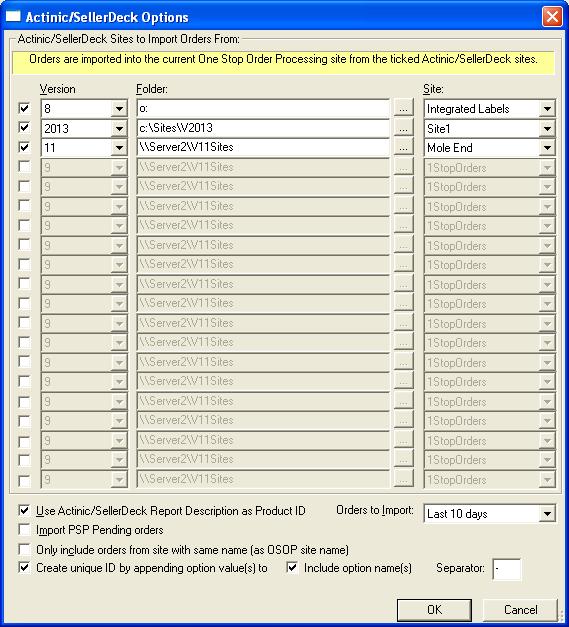
NOTE: Once the orders are imported into One Stop Order Processing any
changes made will not be reflected in SellerDeck
Version
When you select the SellerDeck Version the default site folder is shown in the
Folder. If this is incorrect you can adjust this. This can include mounted remotes
drives (for multi-user SellerDeck). UNC paths are also support. E.g. \\server\Sellerdeck.
If you select an SellerDeck Enterprise version you must select the relevant SQL
Server and database.
Sellerdeck V11 and SellerDeck
If you are importing orders from Sellerdeck V11 or SellerDeck the tracking details are imported into the Custom Entered 11 and 13 fields. These can be used in online tracking, order export, emails and invoices (or packing lists).
Folder
You can change the value folder to look for Actnic sites in. If this is an SellerDeck
Enterprise site then the server details are displayed.
Site
This lists all of the sites (folders) available under the specified folder.
Select the required site to import orders from.
If you wish to import orders from all of your SellerDeck sites you should select
the various in each of the available site slots (up to 20). When the Import
orders button is pressed the relevant orders are imported from all the selected
sites.
Orders to Import
You can import orders based upon their order date. You can import the following
orders:
Today
YesterDay
This Week
Last Week
Last 7 Days
Last 10 Days
This Month
Last 30 Days
Last Month
This Year
Last Year
All
If you use Automation for One Stop Order Processing to automatically import orders any orders already imported will not be overwritten.
Use SellerDeck
Report Description as Product ID
If you use more than 1 product ID for an SellerDeck product (and use the Report
Description field to store the additional item ID) then tick this option.
Import PSP Pending
Orders
If you want to import PSP Pending orders (orders where the customer failed to
complete the checkout process using a payment provider, e.g. SagePay or Paypal)
tick this option. If this option is unticked the PSP pending orders are not
imported.
Only include orders from site with same name (as OSOP site name)
If you want to use the same import settings for multiple sites, but include orders into different OSOP sites tick this option. You will have to change to each OSOP site to the orders
Create unique ID by appending options value(s) to
When products are imported and they have different options in SellerDeck if you tick this option they will be created as unique products in One Stop Order Processing. This means that you can use stock control correctly. For example, if you sell a product in different sizes you can create different products in One Stop Order Processing for each size, with their own stock values. When orders are imported the correct product in the correct size has its stock adjusted.