One Stop Order Processing

One Stop Order Processing |
|
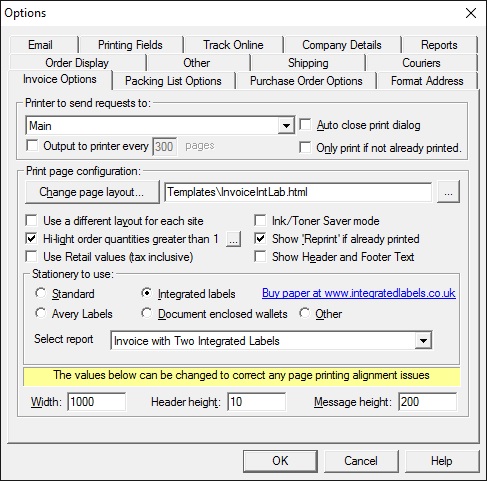
There are certain options related to each report type (Invoice
and Packing List). These are:
Printer to send requests to:
Select a printer to use. You can print the Invoice and Packing List on different
printers. The Invoice and Packing List are printed using Internet Explorer.
If you tick Auto close print dialog you can print by using a single click.
You can also print orders in batches. If you are printing a lot of orders you
may want to send them to the printer in groups, of say 10 orders. For some printers
they work in a slightly better way if they receive information in smaller batches.
To use this feature tick the box, Output to printer every option. You
can then type in the number of pages to print each time.
Print page configuration
After you select the type of stationery to use you can use the default template
or change it by using the Change page layout button.
| Standard layout | A normal sheet of A4 |
| Document enclosed wallets | After printing fold the paper 3 times to get the address in the correct location to place into a document wallet |
| Integrated labels | Print onto an A4 sheet with a single peel off label to place onto the package (paper available from www.integratedlabels.co.uk |
| Avery Labels | Sheets of labels that primarily show the customer's address. You cna also show the items purchased, PPIs etc.. |
Printing configuration values
The invoice and packing list are designed for a standard printer. If you have
any problems with the page text printing too large increase the Page width
value. If you have alignment problems with labels adjust the Page message
height and Page header height.
Other printing tips
You can remove the text displayed at the top and bottom of the invoice and
packing list by unticking the Show Header and Footer Text.
Advanced options
When amending the existing Invoice and Packing List layouts you can use the
following macros to include the order information.
| Macro to use | Description |
| [%INV_CUST_NAME%] | Invoice customer name |
| [%INV_COMPANY%] | Invoice customer company |
| [%INV_TEL_NUM%] | Invoice customer telephone number |
| [%INV_FAX_NUM%] | Invoice customer fax number |
| [%INV_EMAIL%] | Invoice email address |
| [%INV_ADD_LINE1%] | Invoice address line 1 |
| [%INV_ADD_LINE2%] | Invoice address line 2 |
| [%INV_ADD_LINE3%] | Invoice address line 3 |
| [%INV_ADD_LINE4%] | Invoice address line 4 |
| [%INV_COUNTY%] | Invoice County |
| [%INV_POSTCODE%] | Invoice Postcode |
| [%INV_COUNTRY%] | Invoice Country |
| [%INV_BUYER_ID%] | Invoice Buyer ID |
| [%INV_CODE%] | Invoice Customer Code |
| [%DEL_CUST_NAME%] | Delivery customer name |
| [%DEL_COMPANY%] | Delivery customer company |
| [%DEL_TEL_NUM%] | Delivery customer telephone number |
| [%DEL_FAX_NUM%] | Delivery customer fax number |
| [%DEL_EMAIL%] | Delivery email address |
| [%DEL_ADD_LINE1%] | Delivery address line 1 |
| [%DEL_ADD_LINE2%] | Delivery address line 2 |
| [%DEL_ADD_LINE3%] | Delivery address line 3 |
| [%DEL_ADD_LINE4%] | Delivery address line 4 |
| [%DEL_COUNTY%] | Delivery County |
| [%DEL_POSTCODE%] | Delivery Postcode |
| [%DEL_COUNTRY%] | Delivery Country |
| [%DEL_BUYER_ID%] | Delivery Buyer ID |
| [%DEL_CODE%] | Delivery Customer Code |
| [%DEL_ADD%] | Complete delivery address. Blank lines are removed and the country is displayed using the country option in the Printing fields options. |
| [%INV_ADD%] | Complete invoice address. Blank lines are removed and the country is displayed using the country option in the Printing fields options. |
| [%SALES_SOURCE%] | Source for the order (e.g. Ebay) |
| [%SALES_NAME%] | Named used for the Sales source (e.g. My Ebay shop) |
| [%ORD_NUM%] | Sale order number |
| [%ORD_NUM_FORMATTED%] | Sale order number in the form XXXX-XXXX-XXXX |
| [%ORD_TRANS_ID%] | Transaction Identifier |
| [%ORDER_ID%] | Order ID (maybe different from [%ORD_NUM%]) |
| [%INVOICE_NUM%] | Invoice number |
| [%INVOICE_NUM_FORMATTED%] | Invoice number in the form XXXX-XXXX-XXXX |
| [%CHECKOUT_DATE%] | Date when the checkout was completed |
| [%ORD_DATE%] | Date when the order was processed by the website (normally the same as [%CHECKOUT_DATE%]) |
| [%INV_DATE%] | Invoice date |
| [%PAY_DATE%] | Date when payment was taken |
| [%DISPATCH_DATE%] | Date when the order was shipped (sent) |
| [%IMPORT_DATE%] | Date when the order was imported |
| [%LISTED_ON%] | Sub-site item was sold on (e.g. Ebay Express) |
| [%PAYMENT_METHOD%] | Payment method used |
| [%PAYMENT_STATUS%] | Payment status |
| [%ORD_TOTAL_PAID%] | Total amount paid |
| [%PAYPAL_ID%] | Paypal ID (if appropriate) |
| [%VAT_NUMBER%] | Order VAT number (mainly used for other EC country sale not paying VAT) |
| [%INVOICE_VAT_NUMBER%] | Invoice Customer VAT number (mainly used for other EC country sale not paying VAT) |
| [%DELIVERY_VAT_NUMBER%] | Delivery Customer VAT number (mainly used for other EC country sale not paying VAT) |
| [%CURRENCY%] | Currency for the order |
| [%PO_NUMBER%] | Purchase order number |
| [%TOTAL_WEIGHT%] | Total weight of order |
| [%POSTAL_SERVICE%] | Postal service required for order |
| [%DELIVERY_INSTRUCTIONS%] | Any special delivery instructions |
| [%COURIER%] | Courier to use for sending the order to the customer |
| [%TRACKING_ID%] | Any tracking number to send to customer to be able to track order |
| [%TRACKING_INFO%] | Any additional information required for the order for tracking (e.g. website address to use) |
| [%COURIER_LABEL_IMAGE%] | Courier Label (Portrait). This will display the first label for the order. For 2nd label use [%COURIER_LABEL_IMAGE-2%] |
| [%COURIER_LABEL_IMAGE2%] | Courier Label (Landscape). This will display the first label for the order. For 2nd label use [%COURIER_LABEL_IMAGE2-2%] |
| [%COURIER_LABEL_IMAGE3%] | Additional Courier Label, e.g. CN22. This will display the first label for the order. For 2nd label use [%COURIER_LABEL_IMAGE3-2%] |
| [%FEEDBACK_LEFT%] | Feedback left for customer |
| [%FEEDBACK_RECEIVED%] | Feedback received from customer |
| [%NOTES%] | Notes for order |
| [%ORD_SUB_TOTAL%] | Total cost of all items ordered (not including VAT) |
| [%ORD_SUB_TOTAL_TAX%] | Tax on total cost of items |
| [%ORD_PNP%] | Total Postage and Packing (not including VAT) |
| [%ORD_PNP_TAX%] | Tax on Postage and Packing |
| [%ORD_INSURANCE%] | Insurance on order (not including VAT) |
| [%ORD_INSURANCE_TAX%] | Tax on Insurance |
| [%ORD_TOTAL_TAX%] | Total tax on order |
| [%ORD_TOTAL_NO_TAX%] | Total of all items, postage and insurance |
| [%ORD_GRAND_TOTAL%] | Total of all items, P&P, Insurance and Tax |
| [%TOTAL_ORDER_QTY%] | Total number of items in the order |
| [%TOTAL_ORDER_LINES%] | Total number of lines in the order (not including components) |
| [%ORD_FEES%] | Fees for order. For Ebay and Amazon this will be the total tax collected by the website. The IOSS / OSS code for the order will be in the Oder tax value, [%VAT_NUMBER%] |
| [%ITEM_IDn%] | Item ID. n can be from 1 to 200. |
| [%ITEM_TITLEn%] | Item Title. n can be from 1 to 200. |
| [%ITEM_SKUn%] | Item SKU. This normally is your own part number (ID). n can be from 1 to 200. |
| [%ITEM_ORIG_SKUn%] | Item SKU before any mapping that was done (from an Order Type SKU). This normally is your own part number (ID). n can be from 1 to 200. |
| [%ITEM_QTYn%] | Quantity of item. n can be from 1 to 200. |
| [%ITEM_HARMON_CODEn%] | Harmonised 8 digit tariff code, required for export documentation (including CN22, CN24) |
| [%ITEM_ORIG_QTYn%] | Origjnal quantity of item. This is the value when imported or created, before any changes have been made. n can be from 1 to 200. |
| [%ITEM_PRICEn%] | Price of item. n can be from 1 to 200. |
| [%ITEM_VAT_RATEn%] | VAT rate applied to this item. n can be from 1 to 200. |
| [%ITEM_TAXn%] | Tax (VAT) on the item. n can be from 1 to 200. |
| [%ITEM_TOTALn%] | Total cost of item (including TAX). n can be from 1 to 200. |
| [%ITEM_WEIGHTn%] | Weight of item (normally in Kilos). n can be from 1 to 200. |
| [%ITEM_FIELD1n%] | First additional order details field.. n can be from 1 to 200. |
| [%ITEM_FIELD2n%] | Second additional order details field.. n can be from 1 to 200. |
| [%ITEM_FIELD3n%] | Third additional order details field.. n can be from 1 to 200. |
| [%ITEM_FIELD4n%] | Fourth additional order details field.. n can be from 1 to 200. |
| [%ITEM_FIELD5n%] | Fifth additional order details field.. n can be from 1 to 200. |
| [%ITEM_MESSAGEn%] | Any order message. e.g. gift message .. n can be from 1 to 200. |
| [%ITEMS_ORDERED%] | All the items ordered including Postage and Packing, Insurance and Tax. Uses Item IDs |
| [%ITEMS_ORDERED2%] | All the items ordered including Postage and Packing, Insurance and Tax. Uses Item SKUs |
| [%ITEMS_ORDERED3%] | All the items ordered including Postage and Packing, Insurance and Tax. Uses Item IDS and SKUs |
| [%ITEMS_PACKING_LIST%] | All the items ordered. No costs shown. Uses Item IDs |
| [%ITEMS_PACKING_LIST2%] | All the items ordered. No costs shown. Uses Item SKUs |
| [%ITEMS_PACKING_LIST3%] | All the items ordered. No costs shown. Uses Item SKUs and IDs |
| [%CUSTOM_ENTERED1%] | Custom field 1 entered for the order |
| [%CUSTOM_ENTERED2%] | Custom field 2 entered for the order |
| [%CUSTOM_ENTERED3%] | Custom field 3 entered for the order |
| [%CUSTOM_ENTERED4%] | Custom field 4 entered for the order |
| [%CUSTOM_ENTERED5%] | Custom field 5 entered for the order |
| [%CUSTOM_ENTERED6%] | Custom field 6 entered for the order |
| [%CUSTOM_ENTERED7%] | Custom field 7 entered for the order |
| [%CUSTOM_ENTERED8%] | Custom field 8 entered for the order |
| [%CUSTOM_ENTERED9%] | Custom field 9 entered for the order |
| [%CUSTOM_ENTERED10%] | Custom field 10 entered for the order |
| [%CUSTOM_ENTERED11%] | Custom field 11 entered for the order |
| [%CUSTOM_ENTERED12%] | Custom field 12 entered for the order |
| [%CUSTOM_ENTERED13%] | Custom field 13 entered for the order |
| [%CUSTOM_ENTERED14%] | Custom field 14 entered for the order |
| [%CUSTOM_ENTERED15%] | Custom field 15 entered for the order |
| [%CUSTOM_ENTERED16%] | Custom field 16 entered for the order |
| [%CUSTOM_ENTERED17%] | Custom field 17 entered for the order |
| [%CUSTOM_ENTERED18%] | Custom field 18 entered for the order |
| [%CUSTOM_ENTERED19%] | Custom field 19 entered for the order |
| [%CUSTOM_ENTERED20%] | Custom field 20 entered for the order |
| [%CUSTOM_ENTERED21%] | Custom field 21 entered for the order |
| [%CUSTOM_ENTERED22%] | Custom field 22 entered for the order |
| [%CUSTOM_ENTERED23%] | Custom field 23 entered for the order |
| [%CUSTOM_ENTERED24%] | Custom field 24 entered for the order |
| [%CUSTOM_ENTERED25%] | Custom field 25 entered for the order |
| [%CUSTOM_ENTERED26%] | Custom field 26 entered for the order |
| [%CUSTOM_ENTERED27%] | Custom field 27 entered for the order |
| [%CUSTOM_ENTERED28%] | Custom field 28 entered for the order |
| [%CUSTOM_ENTERED29%] | Custom field 29 entered for the order |
| [%CUSTOM_ENTERED30%] | Custom field 30 entered for the order |
| [%CUSTOM_ENTERED31%] | Custom field 31 entered for the order |
| [%CUSTOM_ENTERED32%] | Custom field 32 entered for the order |
| [%CUSTOM_ENTERED33%] | Custom field 33 entered for the order |
| [%CUSTOM_ENTERED34%] | Custom field 34 entered for the order |
| [%CUSTOM_ENTERED35%] | Custom field 35 entered for the order |
| [%CUSTOM_ENTERED36%] | Custom field 36 entered for the order |
| [%CUSTOM_ENTERED37%] | Custom field 37 entered for the order |
| [%CUSTOM_ENTERED38%] | Custom field 38 entered for the order |
| [%CUSTOM_ENTERED39%] | Custom field 39 entered for the order |
| [%CUSTOM_ENTERED40%] | Custom field 40 entered for the order |
| [%CUSTOM_ENTERED41%] | Custom field 41 entered for the order |
| [%CUSTOM_ENTERED42%] | Custom field 42 entered for the order |
| [%CUSTOM_ENTERED43%] | Custom field 43 entered for the order |
| [%CUSTOM_ENTERED44%] | Custom field 44 entered for the order |
| [%CUSTOM_ENTERED45%] | Custom field 45 entered for the order |
| [%CUSTOM_ENTERED46%] | Custom field 46 entered for the order |
| [%CUSTOM_ENTERED47%] | Custom field 47 entered for the order |
| [%CUSTOM_ENTERED48%] | Custom field 48 entered for the order |
| [%CUSTOM_ENTERED49%] | Custom field 49 entered for the order |
| [%CUSTOM_ENTERED50%] | Custom field 50 entered for the order |
| [%CUSTOM_FIXED1%] up to [%CUSTOM_FIXED50%]. These values are defined in the Customize Current View dialog | |
Product Macros. You can display more details for each product on an order line by using the following macros. Where n is the orderline to display. n can be from 1 to 100 |
|
| [%PRODUCT_SKUn%] | Product SKU |
| [%PRODUCT_EANn%] | Product EAN |
| [%PRODUCT_TITLEn%] | Product Title |
| [%PRODUCT_DESCn%] | Product Description |
| [%PRODUCT_BINn%] | Product bin/location in the warehouse |
| [%PRODUCT_PRICEn%] | Product price |
| [%PRODUCT_SHIP_COSTn%] | Product shipping cost |
| [%PRODUCT_VAT_RATEn%] | Product VAT rate |
| [%PRODUCT_WEIGHTn%] | Product weight |
| [%PRODUCT_HEIGHTn%] | Height of the product. This can either be the shipment size or item size |
| [%PRODUCT_WIDTHn%] | Width of the product. This can either be the shipment size or item size |
| [%PRODUCT_DEPTHn%] | Depth of the product. This can either be the shipment size or item size |
| [%PRODUCT_TYPEn%] | Product type. This is the group that you have assigned the product to (e.g. Tools) |
| [%PRODUCT_STOCK_LEVELn%] | Product current stock level |
| [%PRODUCT_STOCK_REORDER_LEVELn%] | Product stock level to reorder at |
| [%PRODUCT_STOCK_OUT_LEVELn%] | Product stock level when is out of stock |
| [%PRODUCT_COST_PRICEn%] | Product cost price |
| [%PRODUCT_COST_PRICE_SHIPPINGn%] | Product cost price of shipping |
| [%PRODUCT_CURRENCYn%] | Product currency |
| [%PRODUCT_NOTESn%] | Product notes (that you enter) |
| [%PRODUCT_ACTINIC_SKUn%] | Product SellerDeck SKU |
| [%PRODUCT_AMAZON_MP_SKUn%] | Product Amazon Marketplace SKU |
| [%PRODUCT_AMAZON_SC_SKUn%] | Product Amazon SellerCentral SKU |
| [%PRODUCT_CUBE_CART_SKUn%] | Product CubeCart SKU |
| [%PRODUCT_EDIRECTORY_SKUn%] | Product Edirectory SKU |
| [%PRODUCT_INTERSPIRE_SKUn%] | Product Interspire SKU |
| [%PRODUCT_EBAY_SKUn%] | Product Ebay SKU |
| [%PRODUCT_EBID_SKUn%] | Product eBid SKU |
| [%PRODUCT_ONE_STOP_SKUn%] | Product OSOP SKU |
| [%PRODUCT_OSCOMMERCE_SKUn%] | Product osCommerce SKU |
| [%PRODUCT_RAKUTEN_SKUn%] | Product Rakuten SKU |
| [%PRODUCT_ROMAN_CART_SKUn%] | Product Roman Cart SKU |
| [%PRODUCT_XCART_SKUn%] | Product X-Cart SKU |
| Product Macros used for product feeds | |
| [%PRODUCT_ORIGINAL_PRICEn%] | Product original price, used for sales |
| [%PRODUCT_AVAILABILITYn%] | Product availability, e.g. 3 days |
| [%PRODUCT_BRANDn%] | Product brand, e.g. Dolce Gusto |
| [%PRODUCT_CATEGORYn%] | Product category, e.g. Small applicances |
| [%PRODUCT_CONDITIONn%] | Product condition, e.g. new |
| [%PRODUCT_DURATIONn%] | Product duration of sale, e.g. 7 (for 7 days) |
| [%PRODUCT_IMAGE1-n%] | Product image, e.g. image1.jpg |
| [%PRODUCT_IMAGE2-n%] | Product mage 2 |
| [%PRODUCT_IMAGE3-n%] | Product image 3 |
| [%PRODUCT_IMAGE4-n%] | Product image 4 |
| [%PRODUCT_IMAGE5-n%] | Product image 5 |
| [%PRODUCT_MANUFACTURERn%] | Product manufacturer, e.g. Nescafe |
| [%PRODUCT_PRODUCT_TYPEn%] | Product type, e.g. electrical |
| [%PRODUCT_SEARCH_TERMSn%] | Product search terms, e.g. Coffee, kitchen |
| [%PRODUCT_SELLING_FORMATn%] | Product selling format, e.g. GTC |
| [%PRODUCT_SHIPPING_DESTINATIONn%] | Product shipping destinations, e.g. UK (or 7) |
| [%PRODUCT_TYPEn%] | Product type. This is the type for system, e.g. for Amazon Toys & Games. |
| [%PRODUCT_WEBPAGEn%] | Product webpage for product. Used for websites that (also) sell item) |
| [%PRODUCT_ASINn%] | Product Amazon ID |
| [%PRODUCT_CUSTOM1-n%] | Product custom value. This can be any value that you want to use. You can have up to 20 additional values for a product. |
| [%PRODUCT_CUSTOM2-n%] | Custom value 2 |
| [%PRODUCT_CUSTOM3-n%] | Custom value 3 |
| [%PRODUCT_CUSTOM4-n%] | Custom value 4 |
| [%PRODUCT_CUSTOM5-n%] | Custom value 5 |
| [%PRODUCT_CUSTOM6-n%] | Custom value 6 |
| [%PRODUCT_CUSTOM7-n%] | Custom value 7 |
| [%PRODUCT_CUSTOM8-n%] | Custom value 8 |
| [%PRODUCT_CUSTOM9-n%] | Custom value 9 |
| [%PRODUCT_CUSTOM10-n%] | Custom value 10 |
| [%PRODUCT_CUSTOM11-n%] | Custom value 11 |
| [%PRODUCT_CUSTOM12-n%] | Custom value 12 |
| [%PRODUCT_CUSTOM13-n%] | Custom value 13 |
| [%PRODUCT_CUSTOM14-n%] | Custom value 14 |
| [%PRODUCT_CUSTOM15-n%] | Custom value 15 |
| [%PRODUCT_CUSTOM16-n%] | Custom value 16 |
| [%PRODUCT_CUSTOM17-n%] | Custom value 17 |
| [%PRODUCT_CUSTOM18-n%] | Custom value 18 |
| [%PRODUCT_CUSTOM19-n%] | Custom value 19 |
| [%PRODUCT_CUSTOM20-n%] | Custom value 20 |
| Suppliers Macros. You can display suppliers details for each product on an order line by using the following macros. Where N is the supplier number. N can be from 1 to 3. Where n is the orderline to display. n can be from 1 to 200. | |
| [%SUPPLIER_NAMEN-n%] | Supplier contact name |
| [%SUPPLIER_COMPANYN-n%] | Supplier Company |
| [%SUPPLIER_TEL_NUMN-n%] | Supplier telephone number |
| [%SUPPLIER_FAX_NUMN-n%] | Supplier fax number |
| [%SUPPLIER_EMAILN-n%] | Supplier email |
| [%SUPPLIER_ADD_LINE1N-n%] | Supplier address line 1 |
| [%SUPPLIER_ADD_LINE2N-n%] | Supplier address line 2 |
| [%SUPPLIER_ADD_LINE3N-n%] | Supplier address line 3 |
| [%SUPPLIER_ADD_LINE4N-n%] | Supplier address line 4 |
| [%SUPPLIER_COUNTYN-n%] | Supplier county |
| [%SUPPLIER_POSTCODEN-n%] | Supplier postcode |
| [%SUPPLIER_COUNTRYN-n%] | Supplier country |
| [%SUPPLIER_IDN-n%] | Supplier ID |
| [%SUPPLIER_VATN-n%] | Supplier VAT code |
| [%SUPPLIER_CODEN-n%] | Supplier code (your own internal code) |
| [%SUPPLIER_NOTESN-n%] | Supplier notes |
| [%SUPPLIER_ADDN-n%] | Complete supplier address. Blank lines are removed and the country is displayed using the country option in the Printing fields options. |
| Other Useful Macros not related to the Order or Product | |
| [%DATE%] | Today's date, in the format DD/MM/YEAR (e.g. 01/02/2019). You can use a different format using the [D] macro. e,g, [%DATE%][D]1 (which would become yyyy-mm-dd, 2019-02-01) |
| [%DATETIME%] | Today's date incuding time in the format DD/MM/YEAR HH:MM. e.g. 0/02/2019 12:14. |
| [%TOMORROW_DATE%] | Tomrrow's date in the format DD/MM/YEAR (e.g. 02/02/2019). You can use a different format using the [D] macro. e,g, [%DATE%][D]1 (which would become yyyy-mm-dd, 2019-02-02) |
| [%TOMORROW_DATETIME%] | Tomrrow's date incuding time in the format DD/MM/YEAR HH:MM. e.g. 0202/2019 12:14. |
Printing more than 1 order details on a single page
You can put up to 64 orders onto the same sheet of paper. This can be used for
sheets of labels or more efficient packing lists or reports.
To use this feature you must be the macro #NX#n#
somewhere on the page. Where n is the number of orders to put onto this page.
For example, #NX#8# will put
8 orders on a single page.
If you are using HTML layers you must put the macro #PT# at the end of the page.
This will stop more than 1 page being printed onto the same page. The supplied
Avery labels use this technique.
When you have put one (or both) of these macros on the page you can use the
following macros with the order number required to print onto the page. For
example to display the customers name use [%INV_CUST_NAME#1#%], [%INV_CUST_NAME#2#%],
[%INV_CUST_NAME#3#%] etc..
[%INV_ADD#n#%]
[%DEL_ADD#n#%]
[%ORD_NUM#n#%]
[%ORD_DATE#n#%]
[%INV_CUST_NAME#n#%]
[%INV_COMPANY#n#%]
[%DEL_CUST_NAME#n#%]
[%DEL_COMPANY#n#%]
[%INV_CUST_NAME#n#%]
[%INV_COMPANY#n#%]
[%INV_TEL_NUM#n#%]
[%INV_FAX_NUM#n#%]
[%INV_EMAIL#n#%]
[%INV_ADD_LINE1#n#%]
[%INV_ADD_LINE2#n#%]
[%INV_ADD_LINE3#n#%]
[%INV_ADD_LINE4#n#%]
[%INV_COUNTY#n#%]
[%INV_POSTCODE#n#%]
[%INV_COUNTRY#n#%]
[%INV_BUYER_ID#n#%]
[%INV_CODE#n#%]
[%DEL_CUST_NAME#n#%]
[%DEL_COMPANY#n#%]
[%DEL_TEL_NUM#n#%]
[%DEL_FAX_NUM#n#%]
[%DEL_EMAIL#n#%]
[%DEL_ADD_LINE1#n#%]
[%DEL_ADD_LINE2#n#%]
[%DEL_ADD_LINE3#n#%]
[%DEL_ADD_LINE4#n#%]
[%DEL_COUNTY#n#%]
[%DEL_POSTCODE#n#%]
[%DEL_COUNTRY#n#%]
[%DEL_BUYER_ID#n#%]
[%DEL_CODE#n#%]
[%SALES_SOURCE#n#%]
[%ORD_NUM#n#%]
[%ORD_TRANS_ID#n#%]
[%ORDER_ID#n#%]
[%INVOICE_NUM#n#%]
[%CHECKOUT_DATE#n#%]
[%ORD_DATE#n#%]
[%INV_DATE#n#%]
[%PAY_DATE#n#%]
[%DISPATCH_DATE#n#%]
[%LISTED_ON#n#%]
[%PAYMENT_METHOD#n#%]
[%POSTAL_SERVICE#n#%]
[%PAYPAL_ID#n#%]
[%VAT_NUMBER#n#%]
[%CURRENCY#n#%]
[%PO_NUMBER#n#%]
[%TOTAL_WEIGHT#n#%]
[%DELIVERY_INSTRUCTIONS#n#%]
[%FEEDBACK_LEFT#n#%]
[%FEEDBACK_RECEIVED#n#%]
[%NOTES#n#%]
[%ORD_SUB_TOTAL#n#%]
[%ORD_SUB_TOTAL_TAX#n#%]
[%ORD_PNP#n#%]
[%ORD_PNP_TAX#n#%]
[%ORD_INSURANCE#n#%]
[%ORD_INSURANCE_TAX#n#%]
[%ORD_TOTAL_TAX#n#%]
[%ORD_GRAND_TOTAL#n#%]
For order lines you use the order line followed by the order number. For example, the first line (item) of an order for order 3 would be [%ITEM_ID1#3#%]. An example of this is used in the PackingListIntLab2Orders.html packing list (2 orders per packing list using 2 labels).
[%ITEM_IDN#n#%]
[%ITEM_TITLEN#n#%]
[%ITEM_SKUN#n#%]
[%ITEM_ORIG_SKUN#n#%]
[%ITEM_QTYN#n#%]
[%ITEM_ORIG_QTYN#n#%]
[%ITEM_PRICEN#n#%]
[%ITEM_VAT_RATEN#n#%]
[%ITEM_TAXN#n#%]
[%ITEM_TOTALN#n#%]
[%ITEM_WEIGHTN#n#%]
[%ITEM_SHIPPED_QTYN#n#%]
[%ITEM_PRICEN#n#%]
Changing the printer margins
Printing is performed using Microsoft Internet Explorer. You can override the printer margins by using the #CM# makro. This allows you to have different margins for different invoices etc.. To do this use the following macro:
#CM#Top#Bottom#Left#Right#
This will replace the Top, Bottom, Left and Right margins for this invoice only. The values are in Millimetres.
An example is
#CM#19#19#5#5#
This will set the top and bottom margins to 19 mm and the left and right margins to 5 mm.
Advanced Macros
As well as using macros that represent order, customer or product values you can use the following macros to perform calculations and conditional values. This can be useful if you want to display values that are based upon calculations (e.g. shipping costs based on grand total). You can also conditionally display different text based on other values.
The values used are defined earlier in this section, e.g. [%LISTED_ON%]
Including external files within printed invoices, packing list and purchase orders
You can include the contents of external files (e.g. Terms and Conditions) by using the #=# macro
For example,
#=#C:\TermsAndConds.html#=#
Macros within printed invoices, packing list and purchase orders
You can use macros within emails by putting a #!# around the macro.
These can be used to display different values in emails depending upon other order values. To do this you must use #!# around the macro to run. For example,
#!#[%ORD_GRAND_TOTAL%][<]10[Royal Mail][UKMail]#!#
[+] |
The two values either side are added up |
||||
[-] |
The value to the right is taken away from the value on the left. |
||||
[/] |
The value on the left is divided by the value on the right. |
||||
[*] |
The two values are multiplied together. |
||||
[<] |
Compares the value and if it is less than the value given show the first value otherwise show the second value. For example, to show Parcel Force for orders less than £100 and UKMail for orders over and including £100 use: [%ORD_SUB_TOTAL%] [<] 100 [Parcel Force] [UKMail] |
||||
[>] |
Compares the value and if it is greater than the value given show the first value otherwise show the second value. For example, to alert someone (by adding text into a certain field) to check all orders over £200 use: [%ORD_SUB_TOTAL%] [>] 200 [Check Order] |
||||
[=] |
Compares the value and if it equals value given show the first value otherwise show the second value. This can include text aswell as numeric values. For example, to change the drop shipper depending upon a certain product use: [%ITEM_SKU1%] [=] IL42 [SmartShipper][We Ship] |
||||
[U] |
Make the field UPPERCASE. You should put the opertaor after the field value. This can be useful for making certain fields more visible. For example, to make the Delivery company name UPPERCASE use: [%DEL_COMPANY%] [U] |
||||
[l] |
Make the field lowercase. You should put the opertaor after the field value.This can be useful for making certain fields more readable when joined with other fields. For example, to make the built up sentence (which is itself made up from other fields) more readable use: [%CUSTOM_ENTERED1%][l] |
||||
[$] |
Display a portion of a field. The 2 values following the operator are the position to start in the text followed by the number of characters to use. This can be useful when values have to be a fixed length for certain export functions or using certain characters in a value as a code to another system. For example, to use the first 3 characters of a product code as a warehouse location (or dropshipper) use the following. You can then base other fields on tests on this field. [%ITEM_SKU1%][$][1][3] |
||||
[.] |
Take the absolute value of the number. For example, 19.21 would be shown as 19. This is very useful for any Inland Revenue figures where only the £ (GBP) number is required. |
||||
[#] |
Replace a letter or word with another word. This can be useful if you wish to replace certain words (for branding) or to remove unwanted. |
||||
[D] |
Display the date (if a date field) in the format YYYY-MM-DD. This is useful when some export formats need the date in a different format. The formats supported are: |
||||
[?] |
Find a word within a field. If the text is found show the first value otherwise the second value. For example, to look for the word Fast in the shipping instructions use the following: This is applied to the SKU To see how this macro works this can be broken down into several parts |
||||
<!> |
You can access the underlying data using SQL directly. You will need to know information about the underlying data. You can use the following values in the SQL to reference the current order being displayed:
For example, to show the total tax for all order lines on the main product reference only using the following SQL #!#<!>Select sum(dTax) from TOrderLine where (nOrderLineSeq=[%ORD_ITEM_ID%] AND sSKU='[%SKU%]')#!#
|
||||
| [r] | Round a number to the nearest number of decimals places. For example, if you use the This will show |
||||
| [A] | Remove any accents from accented characters. This is very useful when showing addresses on courier labels. For example, Royal Mail DMO or UPS. To remove the accents from address line use the following macro: [%DEL_ADD_LINE1%][A] |
||||
| [I] | Display the ISO country code. You can use the following macro to show this [%DEL_COUNTRY%][I] the country will be shown as the country ISO code. For example, United Kingdom will be displayed as UK. |
||||
| [Z] | The Zone of the text used (i.e. postcode), for example The returned value is shown below: 1 - Mainland UK |
One Stop Order Processing allows you to import and process orders for Ebay, Amazon, SellerDeck, Shopify, Magento, osCommerce, BigCommerce, RomanCart, eBid, XCart, Oxatis, Groupon, Wowcher, Paypal, Cdiscount. ekmpowershop, Etsy, Flubit, OpenCart, PinnacleCart, PrestaShop, WooCommerce, Weebly, ChannelAdvisor, ASOS Marketplace, OnBuy, Mighty Deals , Mail Order and Telephone Sales
Mole End Group of Companies |
|||||
| Products, plugins and utilities for SellerDeck | All your orders, from all your systems, all together in one simple-to-use application | Integrated label invoice paper and free software packages and templates. Print your invoice and labels at the same time | Print Amazon Despatch Notes with a peel out label with the customer's details on directly from Amazon | Print Ebay Invoices with a peel out label with the customer's details on directly from Ebay | |